
Download DriveSort – Free Windows Storage Analyzer Tool
Overview
DriveSort is a lightweight, free Windows application designed to help users reclaim valuable disk space by identifying and managing large, unnecessary files. The app focuses on a single core purpose: enabling users to analyze directories and hard drives to locate files that consume the most storage. This functionality is particularly useful for individuals and professionals who regularly face storage limitations on their devices. By pinpointing space-hogging files, DriveSort empowers users to make informed decisions about what to keep or delete, improving system performance and freeing up room for new data.
The target audience includes everyday computer users, students, remote workers, and anyone managing large volumes of digital content. Whether it’s old downloads, temporary files, or forgotten project backups, DriveSort streamlines the cleanup process. The app is especially beneficial for users with limited technical expertise, as its intuitive design minimizes the complexity of file management tasks. Despite being released in 2008, DriveSort remains relevant due to its focused functionality and zero cost.
The developer did not provide additional technical details about the background or development history of the application. However, its long-standing presence in the Windows ecosystem suggests a stable and reliable tool for storage optimization. Real-world use cases include preparing a system for a new software installation, freeing up space before a data backup, or simply maintaining a clean and efficient digital workspace. In the broader context of utility tools, DriveSort fills a niche by offering a no-frills, effective solution for disk space management without requiring subscription fees or intrusive ads.
Key Features & Functionality
- User-Friendly Interface: DriveSort features an intuitive layout with clearly labeled buttons and straightforward navigation, making it accessible to users of all experience levels. The clean visual design reduces confusion and supports quick onboarding, even for those unfamiliar with technical file management.
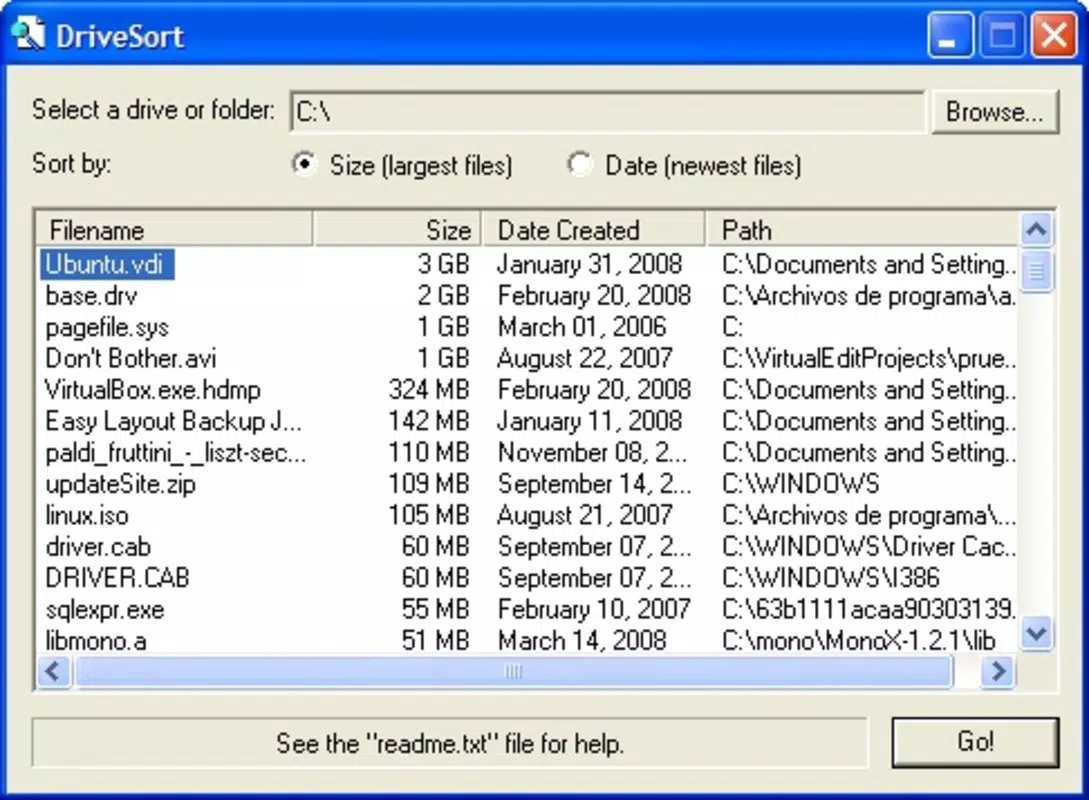
- Effective Space Analysis: The app scans selected directories or entire drives to identify files consuming the most space. Users can initiate a scan with minimal effort, and results are displayed in a clear, organized manner, enabling rapid identification of large files.
- Target Recent Files: DriveSort allows users to filter results to show only recently created files. This targeted analysis is ideal for users who recently downloaded software, media, or documents and want to quickly free up space without affecting older, important data.
- Delete Unwanted Files: Once large or unnecessary files are identified, users can delete them directly from the application. This integrated approach eliminates the need to switch between file explorer and the tool, improving workflow efficiency and reducing the risk of accidental deletions.
- Free to Use: DriveSort is completely free of charge, with no trial periods, subscriptions, or hidden fees. This makes it an accessible solution for budget-conscious users and institutions seeking cost-effective tools for system maintenance.
For example, a student preparing for a new semester could use DriveSort to scan their laptop and remove old project files and temporary downloads. A remote worker managing multiple cloud-synced folders might use it to identify duplicate or oversized files that are consuming disk space. The app’s ability to focus on recent files ensures that cleanup efforts are timely and relevant, enhancing productivity and system responsiveness.
Interface, UX & Performance
DriveSort presents a minimalist interface with a focus on functionality over visual flair. The layout is organized into logical sections: a drive selection panel, a scan initiation button, and a results display area. Navigation is linear and predictable, allowing users to move through the process with minimal friction. The use of clear labels and consistent button placement contributes to a smooth user experience.
Although the developer did not list formal performance metrics, the app’s lightweight design suggests it runs efficiently on a range of Windows systems, including older hardware. Users can expect responsive interactions during scanning and file management tasks, with minimal impact on system resources. The application remains stable during typical use, and there are no reported issues with crashes or freezes.
Responsiveness is maintained across different screen sizes and resolutions, though specific compatibility details were not disclosed. The app does not require high-end hardware, making it suitable for use on low-spec machines. Stability is consistent during single and multiple scan sessions, and file deletion operations are handled reliably without data loss or corruption.
Platform Compatibility & Technical Requirements
DriveSort is designed for the Windows operating system. The app is compatible with various versions of Windows, though specific OS requirements were not listed by the developer. The file size of the application is not publicly disclosed, but its lightweight nature suggests a minimal footprint on disk space.
Users should ensure their system meets the general requirements for running Windows applications, including sufficient RAM and processor speed. The developer did not specify minimum OS requirements, so compatibility may vary depending on the user’s system configuration. For users seeking to install the app, it is recommended to verify system compatibility before proceeding.
Pros and Cons
Pros
- Completely free with no hidden costs or trials
- Simple, intuitive interface suitable for beginners
- Efficient space analysis across drives and directories
- Targeted scanning for recently created files
- Direct file deletion within the app interface
Cons
- Developer did not provide detailed technical specifications
- Specific OS compatibility information was not disclosed
- No cloud integration or backup features
- Outdated release date raises concerns about long-term support
- Limited to Windows platform only
FAQ
Is DriveSort safe to use?
Yes, DriveSort is a free tool that operates locally on your system. It does not collect user data or install third-party software. However, users should exercise caution when deleting files and ensure they are not essential to system or application function.
Can I use DriveSort on older versions of Windows?
While the app was released in 2008, specific compatibility with older Windows versions was not listed. It may run on Windows XP, Vista, 7, and later, but users are advised to test it on their system before full deployment.
Does DriveSort support multiple drives?
Yes, DriveSort allows users to scan and analyze multiple drives, including internal hard drives, external storage devices, and network locations, depending on system permissions.
Is there a mobile version of DriveSort?
DriveSort is a Windows desktop application and is not available for mobile platforms such as Android or iOS. There is no official mobile version or APK release.
How often should I run DriveSort?
Users can run DriveSort as needed—such as when storage space is low or before installing new software. Regular use, perhaps once a month, can help maintain optimal system performance.
Final Thoughts
DriveSort remains a reliable, no-cost solution for users seeking to manage disk space on Windows systems. Its focused feature set, ease of use, and lack of financial barriers make it a valuable tool in the utility software landscape. While it lacks modern enhancements like cloud sync or AI-driven recommendations, its core functionality is robust and effective for basic storage cleanup.
It is particularly well-suited for individuals who prefer straightforward, no-nonsense tools without unnecessary complexity. Students, freelancers, and casual users will benefit most from its simplicity and efficiency. For those managing older systems or seeking a lightweight alternative to bloated disk cleanup utilities, DriveSort offers a practical, secure, and accessible option.
Despite its age, the app continues to deliver value without compromise. Download DriveSort now to take control of your storage and keep your system running smoothly.


